Case Study 3: MPSGS Exhibit Entry Flow
I redesigned and rebuilt the annual exhibit entry form for the Miniature Painters, Sculptors & Gravers Society, turning a single-page legacy form with complex conditional pricing into a gated wizard that shows artists only the questions relevant to their path.
🧩 Challenge
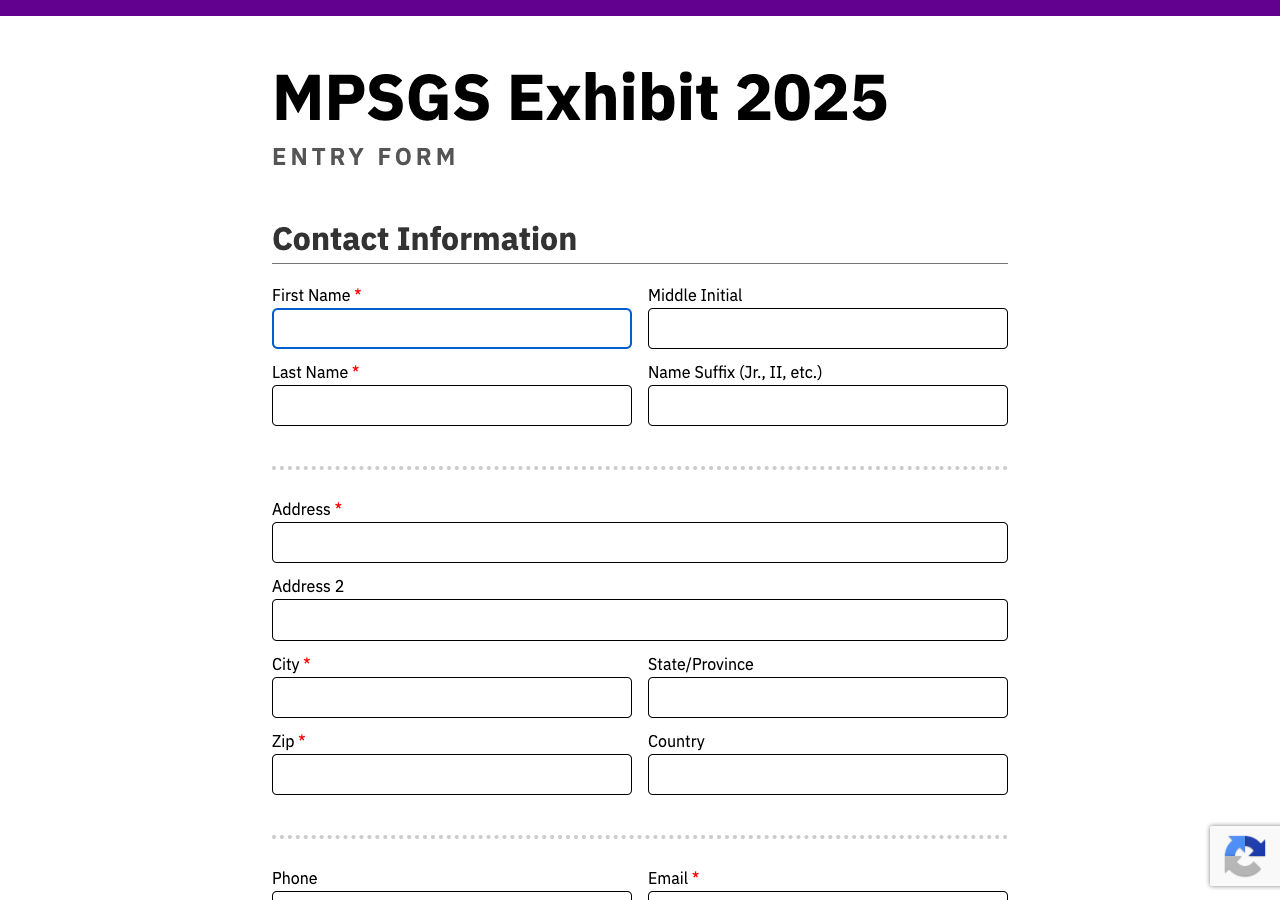
When I took over the MPSGS exhibit entry form in 2022, artists faced a single scrollable page with every section visible at once: contact information, entrant status, three fixed artwork slots, member status, payment options, and submit. The legacy system grew by copying a new folder each year (2024, 2025), duplicating roughly 1,300 lines of HTML/PHP and a 2,240-line JavaScript file with global state and inline handlers.
The pain points were concrete and visible in both the live forms and the code:
Cognitive overload: Artists saw payment and artwork sections even when they only wanted to pay membership dues.
Manual fee selection: Entry fee came from radio buttons ($35 member / $40 hand-delivered / $55 mailed) instead of being inferred from answers.
Validation bypass: "Skip" buttons on validation errors let users proceed anyway.
Fixed artwork slots: Three slots always rendered; empty slots still produced tag placeholders.
No database: Submissions existed only as emailed HTML. Volunteer staff had no admin view, payment reconciliation, or lookup by ID.
Annual copy-paste maintenance: Each year's rule changes meant editing scattered show/hide logic across a monolithic script.
Context and role
This is a freelance client project for a volunteer-run arts nonprofit. I have been the sole designer and developer since 2022, maintaining the form as exhibit rules and pricing change year to year. In 2026 I rebuilt the application from legacy PHP and jQuery to SvelteKit and Supabase while preserving complex business logic for a non-technical curator audience.
Constraints
MPSGS runs on shared Apache hosting without Node.js in production. The rebuild had to work within that environment, not assume a greenfield SaaS stack.
Pricing rules combine membership type, delivery method, international return shipping, optional insurance, donations, and special cases like Emeritus members who owe nothing.
Artists range from first-time entrants to board members and designated receivers. The UX had to be forgiving for users who visit once a year.
Volunteer staff needed submission tracking without learning a complex admin tool.
🗺️ Approach
I improved the legacy form incrementally from 2022 through 2025 before committing to a full rebuild when maintenance cost exceeded the value of patching the old system.
2022–2023: Root-level HTML and PHP mailer folders; refined validation and curator tooling.
2024: Moved to
exhibit/2024/; static index with clearer section grouping.2025: PHP sessions for error repopulation, reCAPTCHA, explicit international return choice, entrant status section.
2026: SvelteKit and Supabase rebuild; 9-step wizard UX, admin dashboard, design system, and database-backed submissions.
The 2026 work was not a visual reskin. I mapped every branching path in Figma first, then translated that gated logic into typed Svelte components with a shared pricing module.
Gated wizard UX
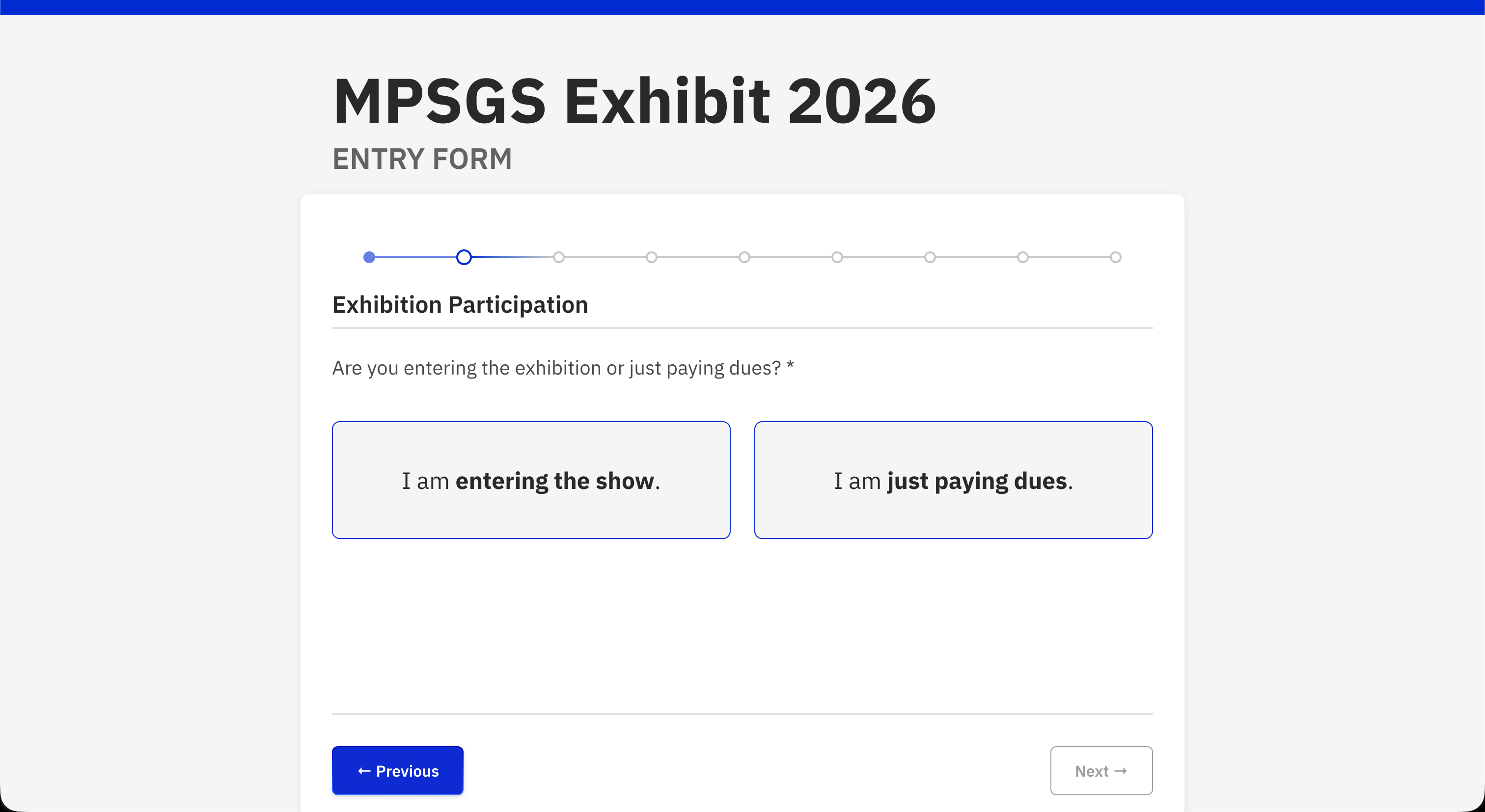
The core UX shift is progressive disclosure: one decision at a time, with a dot stepper, Previous/Next navigation, and a pinned running total at the bottom. Artists paying dues only never see artwork fields. Returning members skip questions meant for new artists. PayPal sub-options appear only when PayPal is selected.
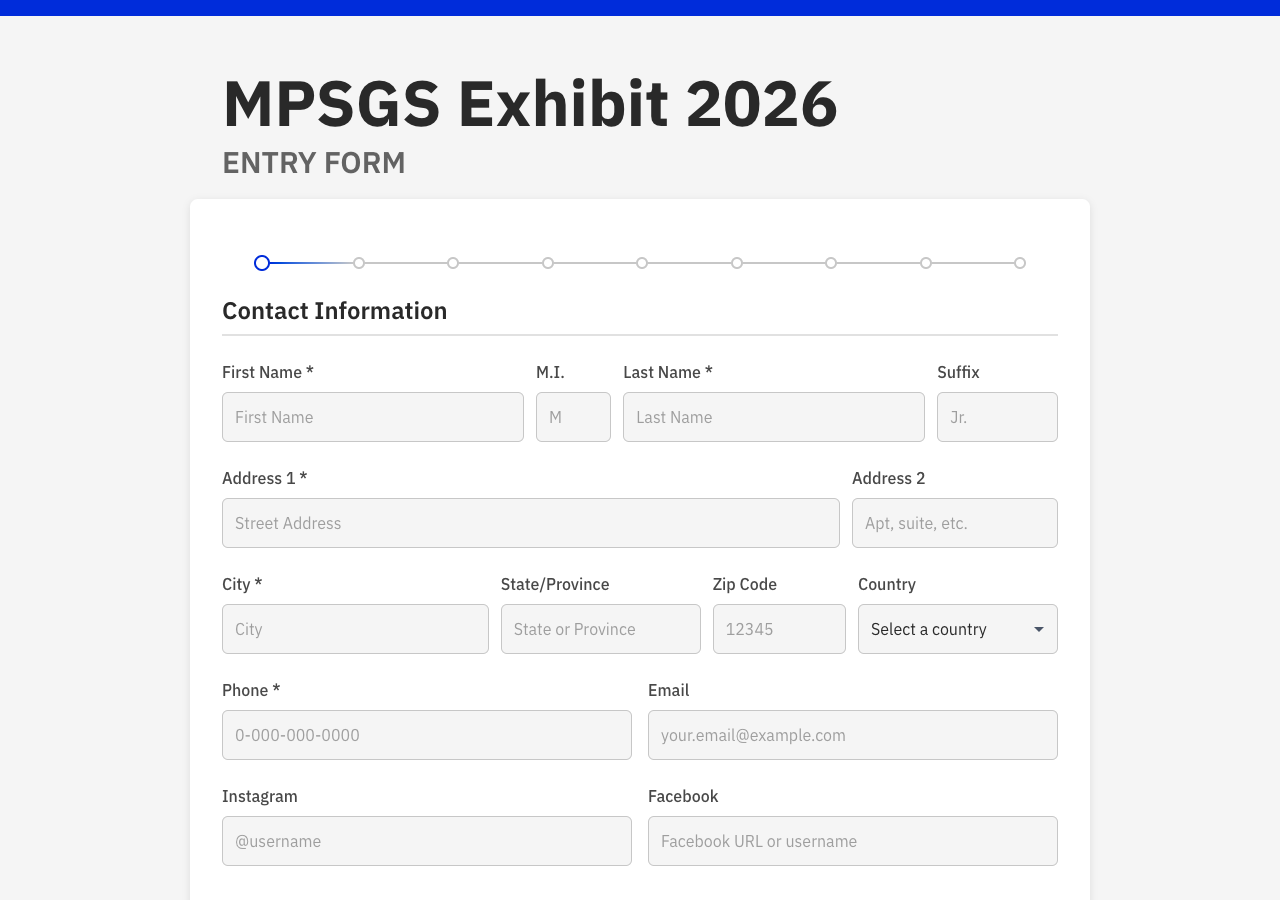
Nine-step wizard overview
| Step | Section | Purpose |
|---|---|---|
| 1 | Contact Information | Name, address, country, phone, email, social |
| 2 | Exhibition Participation | Enter show vs dues-only |
| 3 | New Artist Status | New vs returning (skipped for dues-only) |
| 4 | Branch A or B | Delivery method (new) OR membership status (returning) |
| 5 | Branch | Member type OR delivery method (non-members) |
| 6 | Entry Information | Receiver and up to 3 artworks |
| 7 | Additional Insurance | Optional reimbursement amount |
| 8 | Donation | Optional |
| 9 | Payment and Checkout | Order summary, payment method, submit |
UX improvements I prioritized
Card-selection UI: Large tappable cards with pricing hints replace raw radio buttons.
Auto-calculated pricing: Fees derive from membership path and delivery method. Artists no longer pick their own entry fee tier.
Running total: Transparent pricing before checkout, deliberately frozen during artwork entry so partial entries do not distract with changing totals.
Progressive disclosure: International return shipping ($15) only for non-US addresses; sculpture depth fields only when sculpture is checked; "Other" country free text only when needed.
Structured dimensions: Whole number plus fraction dropdown per axis, serialized with inline validation for exhibit size rules.
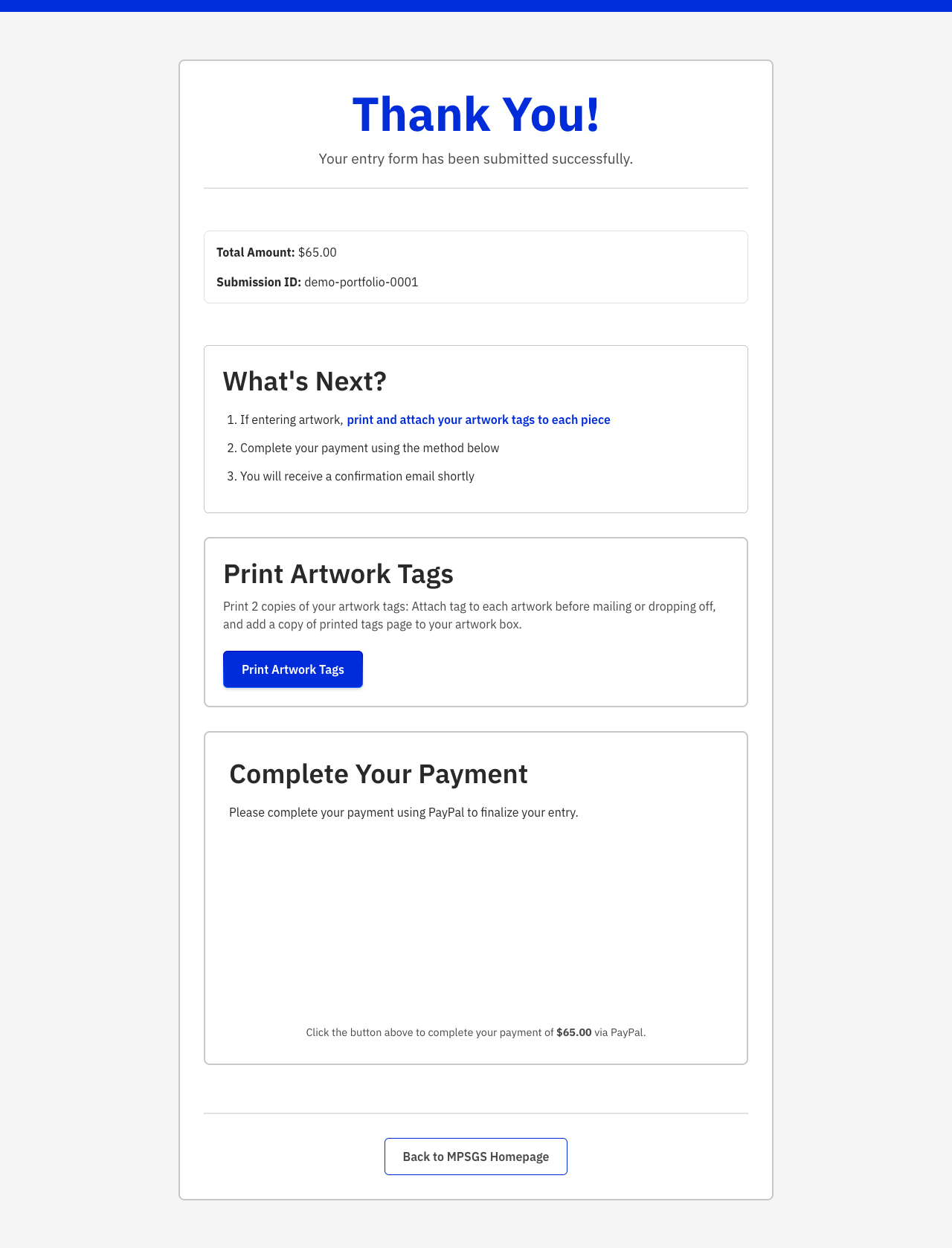
Post-submit confirmation: Dedicated hub with PayPal checkout, check mailing instructions, and inline tag printing instead of a dead-end thank-you page.
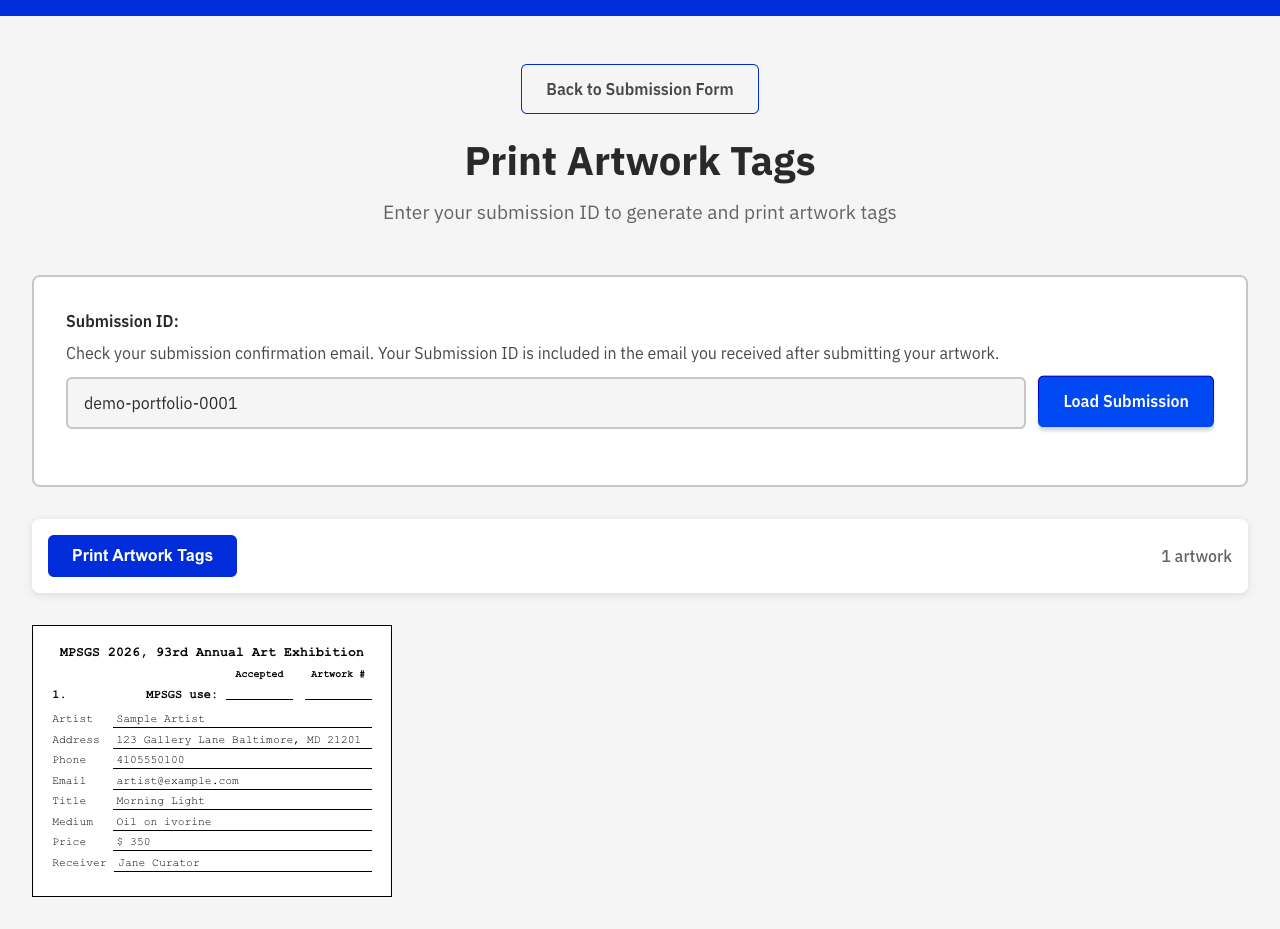
Tag reprint by submission ID: Artists can return via email link without re-submitting.
Print-native workflow: OS print dialog with page-break-safe tag layout instead of maintaining jsPDF and html2canvas.
Key decisions
I made deliberate tradeoffs suited to a volunteer nonprofit on shared hosting, not an ideal enterprise architecture.
| Decision | Rationale |
|---|---|
| Removed cash payment | Treasurer workflow rarely used it; check and PayPal cover actual usage. |
| Browser writes to Supabase + PHP email | Shared hosting has no Node.js. Pragmatic split, not greenfield SaaS. |
| Honeypot over reCAPTCHA v3 | Simpler hosting setup with fewer third-party dependencies. |
| Print CSS over server PDF pipeline | Removed html2canvas and jsPDF maintenance; tags match submitted artworks only. |
| PayPal remains client-side | UX and data capture improved; webhook verification is a future step. |
Pricing logic
Answers map to line items automatically. Pricing constants live in a typed module in the MPSGS codebase so rule changes stay in one place.
| Path | Entry fee | Dues |
|---|---|---|
| Current member | $35 (flat, 1–3 works) | $30 |
| Board member | $0 | $30 |
| Emeritus | $0 | $0 (payment section skipped) |
| Designated receiver | $0 | $30 (optional dues checkbox) |
| Non-member / new artist, hand-delivered | $40 | — |
| Non-member / new artist, mailed | $55 | — |
| Dues only | — | $30 |
Add-ons: international return outside the US (+$15), additional insurance (user-entered), donation (user-entered).
Architecture
The 2026 stack is SvelteKit with adapter-static deployed at
/exhibit/2026, Supabase for submissions, and PHP mail() on the same host
for production email. Development uses a SvelteKit API route with Nodemailer.
| Layer | Technology |
|---|---|
| Frontend | Svelte, SvelteKit, TypeScript, Vite |
| Deployment | adapter-static, base path /exhibit/2026 |
| Database | Supabase (submissions table, JSONB artworks) |
| Email (prod) | PHP mail() via send-email.php on shared LAMP hosting |
| Email (dev) | Nodemailer via SvelteKit API route |
| Payments | PayPal JS SDK on dedicated confirmation page |
| Print/tags | Browser print CSS (no server PDF pipeline) |
Database and admin
Before 2026, submissions existed only as emailed HTML. Volunteer staff had no way to query records, reconcile payments, or look up an entry by ID.
The Supabase submissions table stores normalized contact, membership, and payment
columns plus a full JSON blob for forward compatibility. A UUID submission ID is used
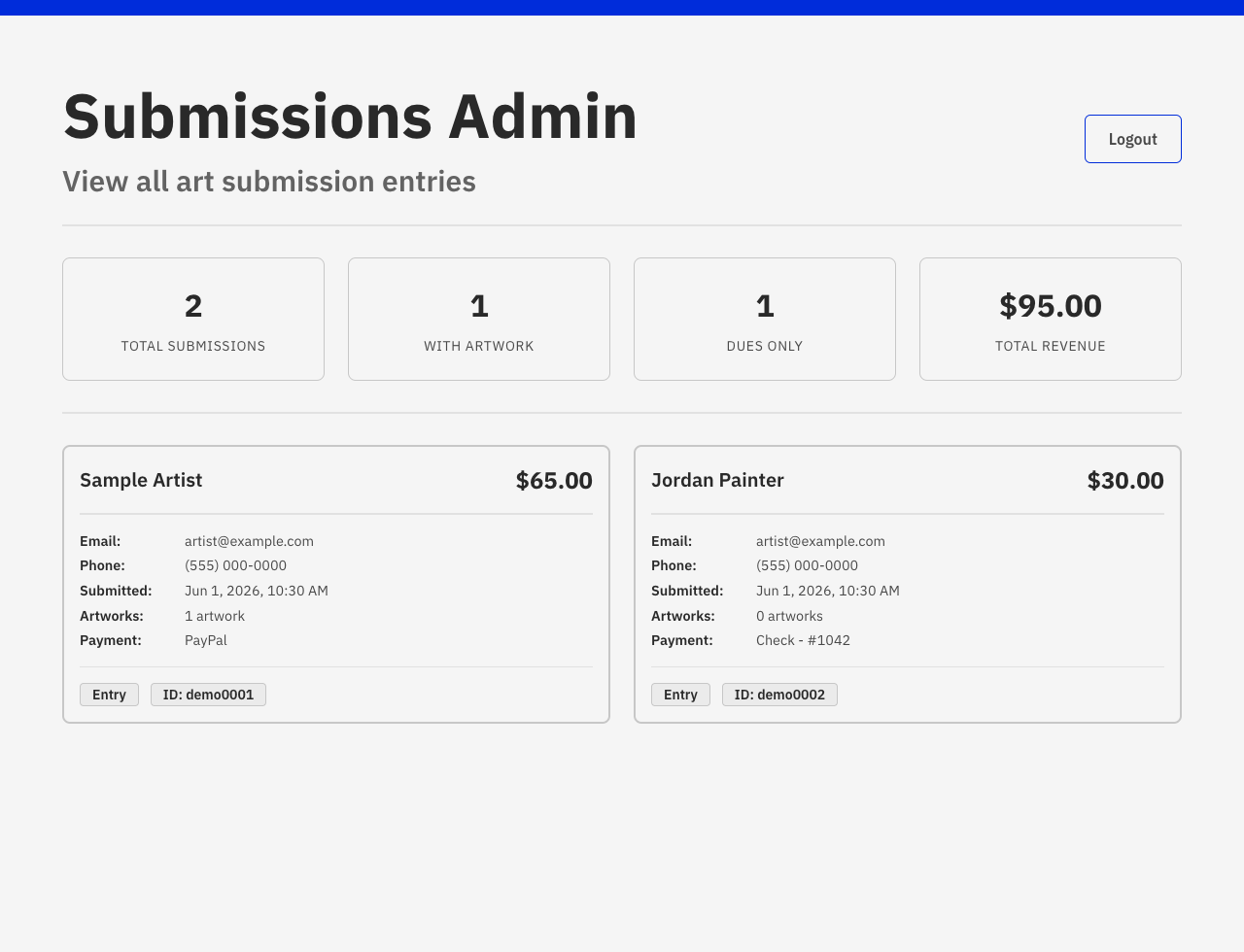
consistently across emails, the confirmation URL, and tag lookup. An admin dashboard at
/admin
gives curators submission lists and revenue stats for the first time. Artists can reprint tags at
/tags using their submission ID.
Accessibility considerations
Accessibility was part of product quality, not a late audit. The wizard targets WCAG 2.2 AA throughout.
Card options use
role="radiogroup"with proper labeling and keyboard support.aria-liveregions announce validation errors and submit status.Next stays disabled until
canProceedvalidates the current step.Native
setCustomValidityenforces dimension and price rules with clear feedback.Print styles support tags and a full-form reference copy for artists who want a paper record.
Loading spinner respects
prefers-reduced-motion.Shared design tokens ensure contrast and visible focus states across themes.
💡 Solution
The live 2026 form replaces cognitive overload with a gated path that puts the right questions in front of each artist at the right time. Confirmation is an action hub, not a dead end. Tags match reality: only submitted artworks, not three empty placeholders.
🎯 Impact and results
Modular codebase
Replaced a ~2,240-line monolithic form.js with typed, componentized Svelte sections that are easier to test and extend.
Queryable submissions
Volunteer staff gained a queryable admin view for submissions, revenue, and entry types for the first time.
One codebase
Eliminated the annual full-folder duplication pattern. Rule changes now live in one codebase instead of scattered copy-paste folders.
Simpler payments
Reduced payment method options from three to two based on actual treasurer usage. Added structured marketing attribution for the first time.
Carey developed a new online entry form system for our Society's annual international art exhibit. He continues to help us refine our system as our specifications change. His skills in programming have been invaluable and made our entry process much easier for the artists. It's been a great pleasure to work with him.
What I would do next
Centralize exhibition year config currently scattered across build config, page titles, email subjects, and tag URLs.
Server-side total recalculation on submit API instead of trusting browser-calculated totals.
PayPal webhook for payment confirmation stored in Supabase.
Stronger admin auth beyond the current lighter client-side pattern.
Reflection
This project is a long client relationship, not a one-off form build. I kept improving the legacy system while the cost of change was lower than a rebuild. When annual folder duplication and scattered show/hide logic became the bottleneck, I moved stacks deliberately. The lesson for me: complex conditional UX for non-technical users rewards patience, clear branching maps, and honest tradeoffs about hosting constraints. The admin and database work also sets up a path toward a more robust exhibition management system over time.